What is a VPN?
- VPN stands for "Virtual Private Network", a service that protects your network connection and online privacy.
- By hiding your IP address, this service creates an encrypted tunnel for your data.
- It not only protects your online identity but also allows you to use public Wi-Fi hotspots securely.
What is a VPN? How does it work?
Watch this short video to learn how a VPN protects your online privacy and security
Quick Navigation
Choose a topic you're interested in to learn more
Benefits of VPN
Using a VPN can protect your online privacy, enhance security, and let you enjoy true internet freedom. Here are the main advantages VPN offers you:
Privacy Protection
Hide your real IP address to prevent websites, advertisers, and ISPs from tracking your online activities. Your browsing history, search records, and online behavior will remain private.
Data Encryption
Protect your network traffic with strong AES-256 encryption. On public Wi-Fi networks, encrypted connections help reduce exposure of personal information and sensitive data.
Geo-unblocking
Bypass geographic restrictions to access content and services from around the world. Watch your favorite movies, TV shows, and visit blocked websites to enjoy true internet freedom.
Public Wi-Fi Security
Use Wi-Fi safely in public places like cafes, airports, and hotels. VPN encrypts your connection to prevent hackers from stealing your personal information and sensitive data.
Anonymous Browsing
Stay anonymous online without being tracked or monitored. Your online identity and browsing habits will be completely confidential, enjoying true privacy protection.
Internet Freedom
Break through internet censorship and restrictions to access blocked websites and services. No matter where you are, you can enjoy an open and free internet experience.
Ready to experience all the benefits VPN brings?
Start NowWhy Do You Need a VPN?
In today's digital world, protecting your online privacy and security is more important than ever. Here are the main reasons you need to use a VPN:
Protect Your Digital Privacy
Network Monitoring Everywhere
Your ISP, government agencies, and even hackers are monitoring your network traffic
Advertisers Track
Websites and advertisers use cookies and trackers to record your browsing habits
Identity Exposure Risk
Your real IP address may reveal your location and identity information
Cybersecurity Threat Statistics
Data Source: 2024 Cybersecurity Report
Business Travel
Safely access your company's network while traveling, protect sensitive business information, and avoid security risks on public Wi-Fi.
Remote Work
Protect company data security when working remotely, ensure the security of remote connections, and meet enterprise security requirements.
Online Shopping
Protect your payment information and credit card data, prevent information leaks and fraud on shopping websites.
Streaming
Bypass geographic restrictions and access global streaming content, enjoy a richer entertainment experience.
Game Players
Protect game account security, avoid DDoS attacks, and enjoy more stable game connections and lower latency.
Students
Safely access academic resources, protect research data, bypass campus network restrictions, and enjoy free internet access.
Important Reminder
In today's network environment, not using a VPN is as dangerous as speaking loudly in a public place. Your personal information, browsing habits, and online activities may be monitored and recorded. Using a VPN is a basic measure to protect your digital privacy.
What Can a VPN Do
A VPN is not just a privacy protection tool, it also provides you with a variety of powerful features and services. Here are the main functions that a VPN can achieve:
Core Security Features
- IP Address Hiding: Completely hides your real IP address to prevent tracking and location
- Traffic Encryption: Protects all network communications with AES-256 strong encryption
- DNS Protection: Prevents DNS hijacking and DNS leak attacks
- Malware Protection: Blocks malicious websites and phishing attacks
Geographical Access Features
- Streaming Unlock: Access global streaming services such as Netflix, Hulu, BBC iPlayer, etc.
- Game Server Access: Connect to game servers around the world for lower latency
- Website Unlock: Bypass geo-restrictions to access blocked websites and services
Advanced Features
- Split Tunneling: Choose which apps use the VPN and which connect directly
- P2P Support: Securely share files and download torrents
Multi-Device Support
- Cross-Platform Compatibility: iOS and Android available now; Windows, macOS, Linux in development.
- Router Support: Protects the entire home network at the router level
- Simultaneous Connections: One account can protect multiple devices at the same time
Function Comparison Table
| Function | Free VPN | Paid VPN |
|---|---|---|
| Data Encryption | ✓ | ✓ |
| No-Log Policy | ✗ | ✓ |
| Streaming Unlock | ✗ | ✓ |
| Customer Support | ✗ | ✓ |
| Number of Servers | Limited | 200+ |
Explore all the features of VPN and provide comprehensive protection for your digital life
How VPN Works
Understand the scientific principles behind VPN technology and how it secures your digital life through encrypted tunnels and remote servers.
VPN Working Principle Diagram
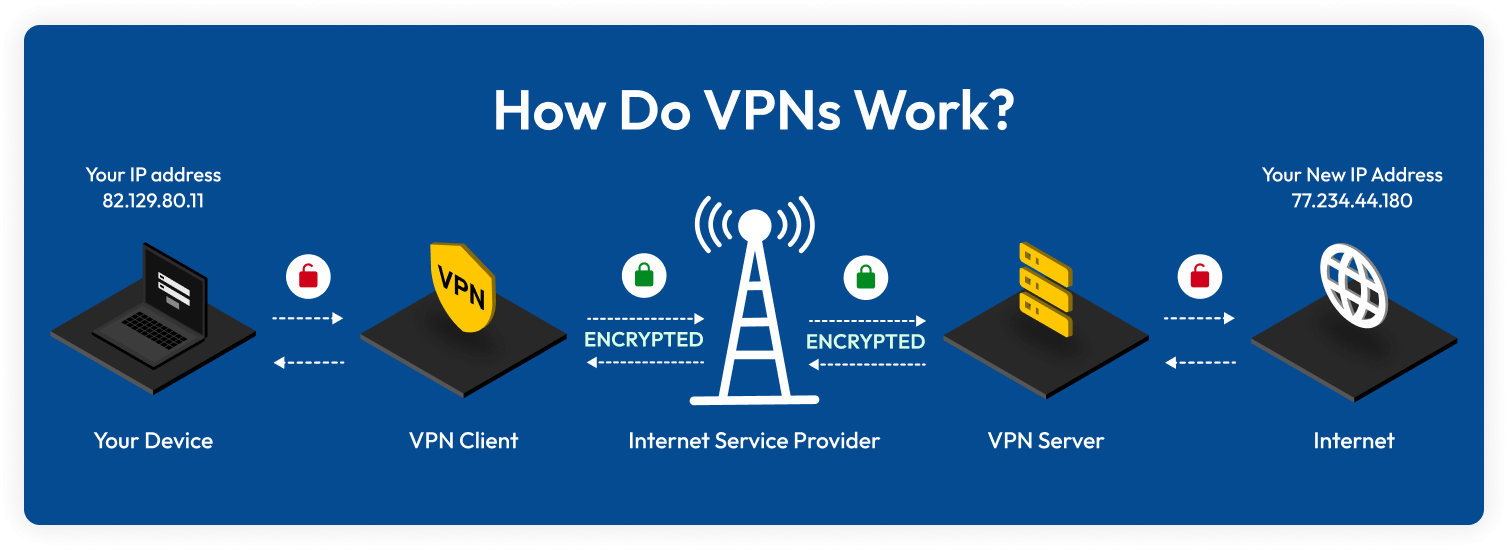
Local Unencrypted Transmission
The data transmission between your device and the VPN client is unencrypted. This is the only unencrypted stage, usually occurring within your local network.
Encrypted Tunnel Transmission
The VPN client encrypts your data and transmits it to the VPN server via your ISP. During this process, even the ISP cannot read your data content.
Server Decryption Processing
The VPN server receives the encrypted data, decrypts it, and then accesses the internet on your behalf with a new IP address, hiding your real identity.
Encryption Technology Details
AES-256 Encryption
Uses 256-bit Advanced Encryption Standard, currently the most powerful symmetric encryption algorithm, adopted by the US government and military.
RSA-4096 Key Exchange
Uses 4096-bit RSA algorithm for key exchange, ensuring secure transmission and negotiation of encryption keys.
Perfect Forward Secrecy
Even if the current session key is compromised, previous communication records remain secure, as each session uses a new key.
VPN Protocol Types
OpenVPN
Open-source protocol offering the best balance of security and performance, supported on all major platforms.
WireGuard
Modern and efficient protocol with concise code, excellent performance, and high security.
IKEv2
Designed for mobile devices, maintains stable connections during network switching.
Why is VPN so secure?
Military-grade Encryption
Uses encryption standards at the level of banks and governments
Complete Anonymity
Hides real identity and location information
Zero-Log Policy
No user activity data is recorded
Now that you understand how VPN works, are you ready to experience this advanced security technology?
Start Using NowVPN Servers
VPN servers are the core of VPN services, distributed around the world to provide you with optimal connection speed, security, and access capabilities. Learn about different types of servers and their features.
Standard Servers
Provide basic VPN functions, including encryption, IP hiding, and geo-unblocking. Suitable for daily use and general privacy protection needs.
Dedicated Servers
Optimized for specific purposes such as streaming, gaming, P2P downloads, etc. Offer better performance and stability.
Onion Routing Servers
Provide the highest level of anonymity through multi-layer encryption and routing, suitable for users with extremely high privacy requirements.
Global Server Distribution
Over 200 servers worldwide covering 40+ countries
How to Choose the Best Server
Geographical Location
Choosing the server closest to you usually gives the best speed
Server Load
Choosing a server with lower load can provide a more stable connection
Special Needs
Choose dedicated servers (streaming, gaming, P2P, etc.) according to your needs
Security Level
For high security requirements, you can choose Onion Routing
Recommended Server Configurations
Daily Use
Choose the server closest to you for the best speed and stability
Streaming
Use dedicated streaming servers to ensure the best viewing experience
Gamers
Choose gaming-optimized servers for a low-latency gaming experience
High Security Needs
Use Onion Routing servers for the highest level of security
Explore our global VPN server network and find the connection point that best suits your needs
VPN Tunneling
VPN tunneling is the core technology that protects your network traffic. It creates a secure encrypted channel for your data to be transmitted safely over the internet. Learn how tunneling technology protects your privacy.
Secure Tunnel
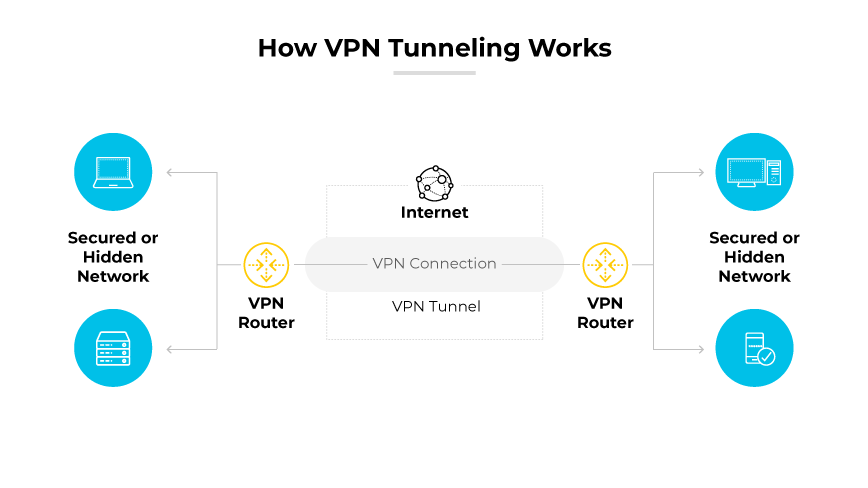
All your data is transmitted through this encrypted channel, and external entities cannot see or intercept it
Point-to-Point Tunnel
Establish a direct secure connection between your device and the VPN server, and all traffic is transmitted through this dedicated channel.
Site-to-Site Tunnel
Connect multiple physical locations to create a secure wide-area network (WAN) connection, suitable for enterprise use.
Remote Access Tunnel
Allow remote users to securely connect to the company network, work as if in the office, and protect remote office security.
Tunneling Encryption Mechanism
Data Packet Encapsulation
The original data packet is encapsulated in the VPN protocol, adding additional security headers and encryption layers to ensure data integrity.
Multi-Layer Encryption
Use multiple encryption algorithms, including symmetric encryption, asymmetric encryption, and hash functions, to provide multiple security protections.
Key Management
Dynamically generate and manage encryption keys, regularly rotate keys, and ensure that even if the key is leaked, it will not affect the security of historical data.
Tunneling Security Advantages
Data Integrity
Use hash algorithms to verify data integrity, ensuring that data is not tampered with or damaged during transmission.
Anti-Replay Attack
Prevent attackers from replaying previously intercepted data packets through timestamps and sequence numbers, ensuring real-time communication.
Traffic Analysis Protection
Hide data packet size, frequency, and pattern, preventing attackers from inferring communication content through traffic analysis.
Main Tunneling Protocol Comparison
| Protocol | Security | Speed | Compatibility | Usage |
|---|---|---|---|---|
| OpenVPN | High | High | Excellent | General |
| WireGuard | High | High | Good | Modern |
| IKEv2 | High | High | Excellent | Mobile |
Learn how tunneling technology protects your data security and experience enterprise-level security protection
Start Secure ConnectionVPN Types
Learn about different types of VPN services, from personal business VPNs to enterprise-level solutions, each type has its unique advantages and application scenarios.
Personal/Business VPN
EnsoVPN, etc.
Business VPN services for personal users, providing a user-friendly interface and rich features
Easy to Use
One-click connection, automatically select the best server, support multiple devices to connect at the same time
Feature-Rich
Streaming unlock, game optimization, P2P support, etc.
Reasonable Price
Monthly fees typically range from $3 to $15, with substantial annual discounts and excellent cost performance.
Enterprise VPN
Cisco AnyConnect, Fortinet, etc.
Enterprise-level VPN solutions designed for centralized management and advanced security features
Centralized Management
Unified management of user permissions, access control, security policies, and audit logs
Advanced Security
Multi-factor authentication, endpoint security, intrusion detection, threat protection, etc.
Technical Support
24/7 technical support, professional services, customized solutions
Open Source VPN
OpenVPN, WireGuard, etc.
VPN solutions based on open source protocols, code transparency, and strong customization
Code Transparency
Source code is open, security experts can review the code, and find potential vulnerabilities
Highly Customizable
Can modify the configuration according to specific needs, support various network environments and security requirements
Low Cost
No license fees are required, but technical knowledge is needed to configure and maintain
Self-Hosted VPN
VPS + VPN Software
Build a VPN service on a cloud server, completely control the server and configuration
Full Control
Can choose server location, configure security policies, and monitor usage
Privacy Protection
Does not rely on third-party services, data is completely controlled by oneself, and privacy is the highest
Technical Requirements
Requires network and server management knowledge, and higher maintenance costs
Detailed Comparison of VPN Types
| Features | Personal/Business VPN | Enterprise VPN | Open Source VPN | Self-Hosted VPN |
|---|---|---|---|---|
| Ease of Use | Very Simple | Simple | Medium | Complex |
| Security | High | Very High | High | Very High |
| Cost | Low | High | Very Low | Medium |
| Technical Support | Good | Excellent | Limited | None |
| Applicable Scenarios | Personal Users, Small Teams | Enterprise, Large Organizations | Technical Users, Developers | Advanced Users, High Privacy Requirements |
How to Choose VPN Types
Personal Users
Choose personal/business VPN, simple operation, rich features, high cost performance
Enterprise Users
Choose enterprise VPN, provide centralized management, advanced security, and professional support
Technical Users
Choose open source VPN, code transparent, customizable, low cost
High Privacy Requirements
Choose self-hosted VPN, full control, highest privacy, but requires technical knowledge
Recommended Combination Schemes
Newbie
Personal/Business VPN + Multiple Device Support, Simple to Use, Feature-Rich
Enterprise Deployment
Enterprise VPN + Centralized Management + Professional Support, Secure and Reliable
Technical Exploration
Open Source VPN + Self-Hosted Server, Learn Technology, Full Control
Hybrid Scheme
Personal VPN Daily Use + Self-Hosted VPN Special Needs, Flexible and Efficient
Choose the most suitable VPN type according to your needs and skill level, and start your secure network journey
VPN Encryption Protocols
VPN encryption protocols are the core technology to protect your data security. Different protocols offer varying levels of security and performance. Learn about the features of each protocol to choose the encryption solution that best suits your needs.
OpenVPN
The most popular open-source VPN protocol, offering strong encryption and cross-platform compatibility. It is the gold standard for security and performance.
WireGuard
A modern and efficient VPN protocol with a simple codebase and excellent performance, becoming the new standard in VPN technology.
IKEv2
A VPN protocol designed for mobile devices, maintaining stable connections during network switches, suitable for users who are frequently on the move.
L2TP/IPsec
A traditional VPN protocol that provides double encryption protection but may be blocked by firewalls, suitable for scenarios where compatibility is not a high priority.
PPTP
An outdated VPN protocol with low security, surpassed by modern encryption standards, not recommended for sensitive data transmission.
SSTP
A VPN protocol developed by Microsoft, using SSL 3.0 encryption, mainly supported on Windows platforms, with good security.
Detailed Protocol Comparison Table
| Protocol | Encryption Algorithm | Port | Firewall Bypass | Recommendation |
|---|---|---|---|---|
| OpenVPN | AES-256, ChaCha20 | 1194 (UDP/TCP) | Yes | ⭐⭐⭐⭐⭐ |
| WireGuard | ChaCha20, Poly1305 | 51820 (UDP) | Yes | ⭐⭐⭐⭐⭐ |
| IKEv2 | AES-256, ChaCha20 | 500, 4500 (UDP) | No | ⭐⭐⭐⭐ |
| L2TP/IPsec | AES-256, 3DES | 1701, 500 (UDP) | No | ⭐⭐⭐ |
| PPTP | MPPE-128 | 1723 (TCP) | No | ⭐ |
Main Encryption Algorithms
AES-256 (Advanced Encryption Standard)
A symmetric encryption algorithm using a 256-bit key, adopted by the US government and military, and one of the most secure encryption standards available.
ChaCha20
A modern stream cipher algorithm with excellent performance on mobile devices, widely adopted by Google and Cloudflare.
Poly1305
A message authentication code algorithm, used together with ChaCha20 to provide data integrity and authenticity verification.
RSA-4096
An asymmetric encryption algorithm used for key exchange and digital signatures, with a 4096-bit key providing extremely high security.
Security Features Explained
Perfect Forward Secrecy
Even if the current session key is compromised, previous communication records remain secure, as each session uses a new key.
Anti-Replay Attack
Prevents attackers from replaying previously intercepted packets using timestamps and sequence numbers, ensuring real-time communication.
Key Rotation
Regularly changes encryption keys, so even if a key is leaked, long-term security is not affected, improving overall security.
How to Choose a VPN Protocol?
Security First
Choose OpenVPN or WireGuard for the highest level of encryption protection
Speed First
Choose WireGuard for the best performance and lowest latency
Mobile First
Choose IKEv2 to maintain a stable connection during network switches
Learn about the features of different VPN protocols and choose the encryption solution that best meets your security needs
Start Secure ConnectionChoosing a VPN
Choosing the best VPN service among many options is not easy. Learn the key selection criteria to find a VPN service that meets your security, privacy, and performance needs.
Core Security Standards
No-Log Policy
Ensure the VPN provider does not record your browsing history, IP address, or online activities
Military-Grade Encryption
Supports strong encryption algorithms such as AES-256 or ChaCha20 to ensure data security
Secure Protocols
Supports modern secure protocols like OpenVPN and WireGuard, and avoids outdated PPTP
DNS Leak Protection
Prevents DNS queries from leaking your real location and browsing intentions
Performance and Features
Number of Servers
More servers mean better connection speeds and fewer geographic restrictions
Streaming Unblocking
Able to bypass geographic restrictions and access streaming services like Netflix and Hulu
P2P Support
Supports torrent downloads and file sharing, suitable for users who need P2P functionality
Split Tunneling
Allows you to choose which apps use the VPN and which connect directly
Compatibility and Usability
Multi-Platform Support
iOS and Android available now; Windows, macOS, Linux in development
Simultaneous Connections
How many devices can be protected by one account at the same time, usually 3-10
User Interface
Is the interface intuitive and easy to use, and does it provide convenient features like one-click connection
Router Support
Whether it supports configuration at the router level to protect the entire home network
Pricing and Customer Support
Pricing Model
Differences in monthly, annual, and multi-year pricing, and whether there is a free trial
Refund Policy
Whether there is a clear refund policy (e.g. money-back windows by plan)
Customer Support
Whether 24/7 online chat, email support, or phone support is provided
Knowledge Base
Whether detailed tutorials, FAQs, and help documents are provided
VPN Purchase Steps
Identify Needs
Clarify your purpose: privacy protection, streaming unblocking, gaming acceleration, etc.
Compare Services
Compare the prices, features, number of servers, and user reviews of different VPNs
Choose a Plan
Choose a monthly, annual, or multi-year plan; annual plans usually have bigger discounts
Register Account
Create an account, choose a payment method, and complete the purchase
Download and Install
Download the client for your platform, install and configure the VPN connection
Purchase Notes
Avoid Free VPNs
Free VPNs usually have data limits, slow speeds, low security, and may even sell user data
Beware of False Advertising
Do not blindly believe in exaggerated claims like "100% anonymous" or "untraceable", and stay rational
Read User Agreement
Carefully read the terms of service and privacy policy to understand data collection and usage
Take Advantage of Trial Periods
Most VPNs offer free trials or money-back guarantees, make full use of these opportunities to test the service
Now that you know how to choose a VPN, are you ready to start your secure online journey?
Setting Up VPN
After purchasing a VPN service, the next step is to set it up and configure it correctly. Follow our detailed guide to easily complete the installation and configuration of your VPN and start enjoying a secure network connection.
Windows Setup Steps
Download Client
Download the Windows client from the official VPN website and make sure to get the latest version.
Install Software
Run the installer and follow the wizard to complete the installation. Administrator privileges may be required.
Log In
Log in to the VPN client using the account information you created during purchase.
Select Server
Choose the nearest server or a server in a specific country.
Connect to VPN
Click the connect button, wait for the connection to be established, and confirm that your IP address has changed.
Mobile Device Setup
Download from App Store
Download the official VPN app from the App Store or Google Play.
Grant Permissions
Allow the VPN app to create VPN configuration profiles and access the network.
Log In and Connect
Log in with your account, select a server, and tap the connect button.
Advanced Configuration Options
Protocol Selection
Choose OpenVPN, WireGuard, or IKEv2 protocol in the settings and adjust according to your needs.
Split Tunneling
Configure which apps use the VPN and which connect directly to optimize network performance.
Auto Connect
Set up options like auto-connect on startup or WiFi auto-connect.
DNS Settings
Configure custom DNS servers to improve resolution speed and security.
Router Configuration
DD-WRT Firmware
Configure the OpenVPN client on routers that support DD-WRT firmware.
VPN Passthrough
Enable VPN passthrough to allow VPN traffic through the router.
Port Forwarding
Set up necessary port forwarding rules to ensure VPN connection works properly.
VPN Setup FAQs
Frequently asked questions, providing you with detailed product information and usage guidance
Network Connection Issues
Firewall Blocking
Add the VPN client as an exception in Windows Firewall, or temporarily disable the firewall for testing.
Antivirus Interference
Add the VPN client to the whitelist in your antivirus software to avoid false positives and blocking.
Network Adapter Issues
Check network adapter settings to ensure the VPN virtual network card is working properly.
DNS Configuration Errors
Reset DNS settings or use public DNS servers such as 8.8.8.8.
Performance Optimization Tips
Choose the Best Protocol
WireGuard usually provides the best performance, while OpenVPN offers the best security.
Server Selection
Choose servers with lower load and closer distance, and avoid using during peak hours.
Split Tunneling Configuration
Use VPN only for traffic that needs protection, and let other traffic connect directly.
Regular Maintenance
Regularly update the client, clear cache, and restart devices to maintain optimal performance.
Important Security Recommendations
Keep Updated
Regularly update the VPN client and operating system.
Privacy Protection
Do not log in to sensitive accounts while connected to the VPN.
Two-Factor Authentication
Enable two-factor authentication for your VPN account.
Now that you know how to set up a VPN, are you ready to start configuring your secure connection?